
REQUEST A FREE ESTIMATE!
Function Inspection Workstation in Manufacturing Quality Control
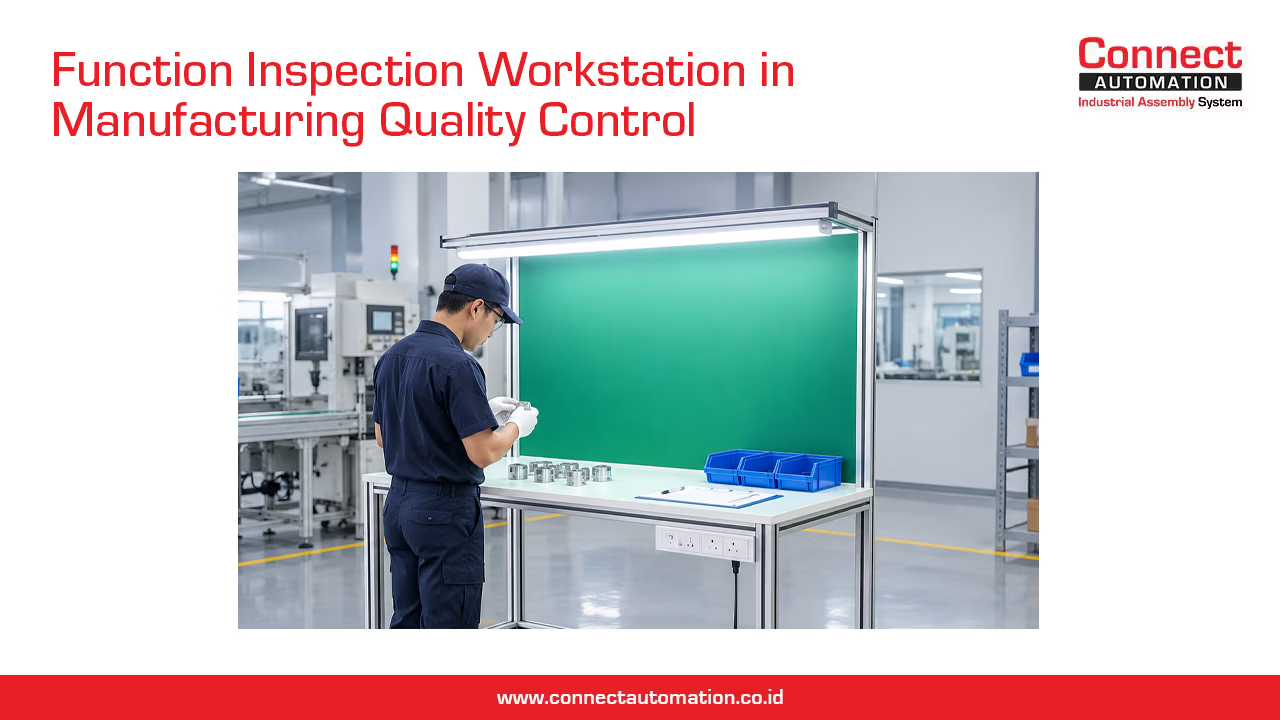
Quality inspection is an important part of the manufacturing process. Before a product moves to the next production stage or reaches the customer, it needs to be checked to ensure that it meets the required specifications and quality standards.
To support this process, manufacturers can use an Inspection & Quality Control Workstation. Rather than simply providing a table for an operator, this type of workstation is specifically designed to organize inspection activities, measuring equipment, product handling, and quality control procedures in one dedicated working area.
With the right design, an inspection workstation can help operators perform inspections more consistently, efficiently, and comfortably.
What Is an Inspection & Quality Control Workstation?
An Inspection & Quality Control Workstation is a dedicated work area designed for inspecting, measuring, testing, sorting, and evaluating products or components during the manufacturing process.
Unlike a standard production workstation, which is primarily designed for assembling or processing products, an inspection workstation focuses on identifying whether a product meets predetermined quality requirements.
Depending on the application, inspection activities can include visual inspection, dimensional measurement, surface inspection, functional checking, weight measurement, labeling verification, and other quality checks.
The workstation can be configured with work surfaces, lighting, measuring instruments, fixtures, tool holders, storage trays, and designated areas for accepted and rejected products.
What Are the Functions of an Inspection Workstation?
An inspection workstation provides several functions that help make quality control activities more organized.
1. Providing a Dedicated Inspection Area
Having a dedicated inspection area helps separate quality checking activities from other production processes. Operators can perform inspections in a controlled environment without interfering with other production activities.
2. Supporting Consistent Inspection Procedures
A well-designed workstation allows tools, measuring equipment, product fixtures, and inspection references to remain in consistent positions.
This makes it easier for operators to follow the same inspection sequence and helps reduce unnecessary variation between inspections.
3. Organizing Inspection Tools and Equipment
Measuring instruments and inspection tools can be placed within the operator's working area. Tool holders, drawers, shelves, and storage trays can help keep equipment organized and easily accessible.
4. Separating Accepted and Rejected Products
Inspection workstations can include dedicated areas for products that have passed inspection and products that require rejection, rework, or further evaluation.
Clear separation helps prevent rejected products from accidentally being mixed with approved products.
5. Supporting Inspection Documentation
Inspection checklists, measurement records, production specifications, or digital displays can be positioned directly at the workstation.
This makes it easier for operators to record inspection results while performing the inspection process.
What Activities Are Performed at an Inspection Workstation?
The inspection method depends on the product and its quality requirements. Common activities include:
1. Visual Inspection
Operators examine the product for visible defects such as scratches, dents, cracks, contamination, incorrect assembly, or surface imperfections.
2. Dimensional Inspection
Products or components are measured to verify that their dimensions meet the required specifications.
Common tools may include calipers, micrometers, gauges, and other measuring instruments.
3. Surface Inspection
Surface condition can be inspected to identify defects, irregularities, or inconsistencies that may affect product quality or appearance.
4. Functional Checking
Some products need to be checked to ensure that their components or functions operate correctly before moving to the next production stage.
5. Weight Checking
For applications where product weight is an important quality parameter, a weighing scale can be integrated into the workstation.
6. Label and Marking Verification
Operators may also check product labels, serial numbers, barcodes, markings, or other identification information to ensure that they match the required specifications.
7. Sorting
After inspection, products can be separated into categories such as accepted, rejected, or requiring further inspection.
The specific inspection activities can be combined according to the characteristics of the product and the requirements of the production process.
Common Components of an Inspection Workstation
The configuration of an inspection workstation depends on the inspection process. However, several components are commonly used.
- Worktable or Workbench : The work surface provides the main area where products are placed and inspected. Its size and height should be selected according to the dimensions of the products and the inspection activities performed.
- Aluminium Profile Frame : Aluminium profiles can be used to create the workstation's structural frame. Their modular characteristics make it easier to adjust the workstation layout and add components such as shelves, tool holders, lighting brackets, and equipment supports.
- Inspection Surface : The inspection surface should provide enough space for the product, tools, measuring instruments, and inspection references. For certain applications, a dedicated surface may be required to support specific inspection methods.
- Lighting : Proper lighting is particularly important for visual inspection. Lighting fixtures can be positioned above or around the inspection area to provide sufficient visibility of product details.
- Tool Holders : Tool holders help keep measuring instruments and inspection tools within easy reach of the operator.
- Fixtures and Jigs : Fixtures or jigs can be used to hold products in a consistent position during inspection. This can be useful when a product needs to be checked from a specific orientation.
- Storage Trays : Trays can be used to organize incoming products, inspected products, samples, or components waiting for further processing.
- OK and NG Areas : Dedicated areas for accepted and rejected products help make product status visually clear and reduce the risk of mixing different product categories.
Why Is Lighting Important in an Inspection Workstation?
Lighting can have a significant impact on visual inspection accuracy. When the inspection area is poorly illuminated, small defects may be difficult to identify. Operators may also experience visual fatigue when performing repetitive inspection tasks for extended periods.
A properly designed lighting system helps illuminate the product surface and makes defects easier to identify. The position and intensity of the lighting should be selected according to the inspection requirements. Some applications may require focused lighting, while others may benefit from more uniform illumination across the entire work surface.
Therefore, lighting should be considered as an integral part of the inspection workstation rather than simply an additional accessory.
How Does an Inspection Workstation Improve Quality Control Consistency?
One of the main advantages of a dedicated inspection workstation is the ability to standardize the inspection environment. For example, the workstation can be designed so that:
- Products are always placed in the same position.
- Measuring tools are stored in designated locations.
- Inspection fixtures maintain consistent product orientation.
- Inspection checklists are positioned where operators can easily access them.
- Accepted and rejected products have clearly separated areas.
- Operators follow a defined inspection sequence.
This type of standardization can make inspection activities easier to repeat and monitor. The goal is not simply to make the workstation look organized, but to create a working environment that supports a consistent inspection process.
Where Are Inspection & Quality Control Workstations Used?
Inspection workstations can be positioned at different stages of a production process depending on where quality verification is required.
1. After Assembly
Products can be inspected after components have been assembled to verify that all parts are correctly installed and meet the required specifications.
2. After Machining
Machined components can be checked for dimensions, surface condition, and other characteristics before moving to the next production stage.
3. After Plastic Molding
Plastic products can be inspected for dimensions, surface defects, deformation, incomplete molding, or other quality issues.
4. After Packaging
Packaging can be inspected to verify labels, markings, seals, product identification, and packaging conditions.
5. Before the Next Production Process
An inspection workstation can be positioned between two production stages to prevent defective products from continuing to the next process.
6. Final Inspection
For some manufacturing processes, a dedicated inspection workstation can be used for final quality verification before products are released for delivery.
Because of this flexibility, inspection workstations can be found in many manufacturing environments, including automotive, electronics, plastics, packaging, food and beverage, pharmaceutical, and general manufacturing.
Manual vs. Automated Inspection Workstations
Inspection workstations can be designed for manual, semi-automated, or automated inspection processes.
1. Manual Inspection Workstation
In a manual inspection workstation, an operator performs the inspection directly using visual observation, measuring tools, gauges, fixtures, or other equipment.
This approach is suitable for products with high variation or inspection processes that require human judgment.
The workstation should therefore prioritize visibility, tool accessibility, ergonomics, and a clear inspection workflow.
2. Automated Inspection Workstation
Automated inspection workstations use technologies such as vision cameras, sensors, automated measurement systems, or other inspection equipment.
These systems can be useful for high-volume production where inspection speed and consistency are important.
The workstation may become part of a larger automated production system, with products automatically transferred into the inspection area and sorted according to the inspection result.
How to Design an Effective Inspection Workstation
The workstation should be designed around the actual inspection process rather than simply selecting a table and adding inspection equipment. Several factors should be considered.
1. Workstation Height
The height of the work surface should allow the operator to perform inspection activities comfortably while maintaining an appropriate working posture.
2. Product Position
Products should be positioned so that important inspection areas are easy to access and observe.
3. Tool Placement
Frequently used tools should be placed within the operator's normal reach to reduce unnecessary movement.
4. Lighting Position
Lighting should provide sufficient visibility without creating excessive glare or shadows that could interfere with visual inspection.
5. OK and NG Product Flow
The workstation should have clearly defined areas for incoming products, inspected products, accepted products, and rejected or rework products.
6. Material Flow
If the inspection workstation is part of a larger production line, its position should support smooth material flow between the previous and next processes.
In some applications, the workstation can be integrated directly with a conveyor or other material handling system.
Inspection Workstation vs. Production Workstation
Although both types of workstation provide a dedicated area for operators, their primary purposes are different. A production workstation focuses on manufacturing activities such as assembly, processing, or product preparation. Its tools and layout are designed primarily around the production task.
An inspection workstation, on the other hand, focuses on checking product quality. Measuring instruments, inspection fixtures, lighting, documentation, and product classification areas become more important. The output is also different. A production workstation produces or processes a product, while an inspection workstation determines whether the product passes inspection, requires rework, or should be rejected.
This distinction is important when designing a workstation because the layout should follow the actual work process and quality requirements.
Conclusion
An Inspection & Quality Control Workstation is a dedicated work area designed to support product inspection and quality control activities in a more organized and consistent way.
By combining an appropriate work surface with lighting, measuring tools, fixtures, storage, and clearly defined product areas, the workstation can help operators perform inspection tasks more efficiently while reducing the possibility of mixing accepted and rejected products.
The design of an inspection workstation should be based on the type of product, inspection method, equipment requirements, operator workflow, and position of the workstation within the production process.
For manufacturing facilities that require frequent and consistent quality checks, a well-designed inspection workstation can become an important part of an efficient and controlled production system.
Connect Automation specializes in providing automation solutions, including conveyor systems, to improve efficiency across various industries. The company delivers cutting-edge technology to help organizations automate tasks and optimize workflows. Connect Automation helps businesses reduce manual efforts, boost productivity, and achieve better outcomes. With a customer-focused approach, the company designs tailored solutions to ensure smooth and effective automation transitions for long-term success.
Kawasan Industri Jababeka Tahap 1, Jl. Jababeka II D Blok C14L Cikarang, Indonesia (17530)
(021) 893 5060 Google Maps
Rungkut Industri III, No. 37, Rungkut Menanggal, Kec. Gn. Anyar Surabaya, Indonesia (60293)
(031) 9985 8624 Google Maps